


PIUSI B.SMART
4.06.00 Reviews
App Specs
- Version
- 2.4.2
- Updated On
- License
- Free
- Downloads
- 50,000+
- Developer
- Piusi S.p.A
- Categories
- Auto & Vehicles
- Platform
- Android
Screenshots

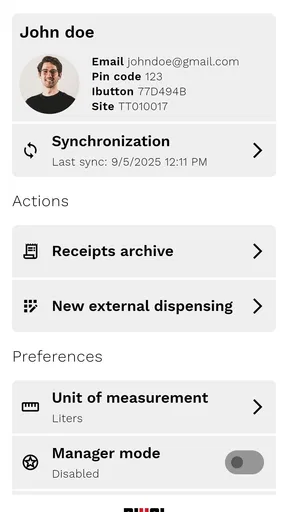
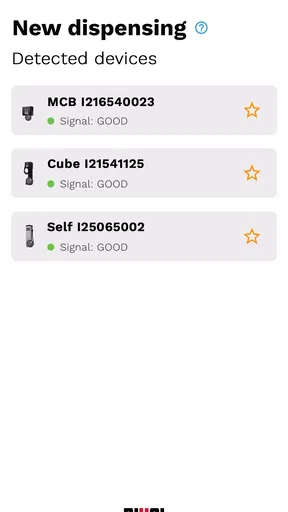
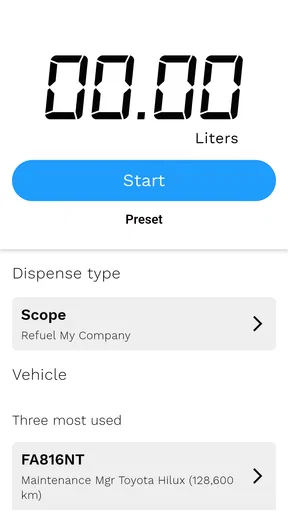
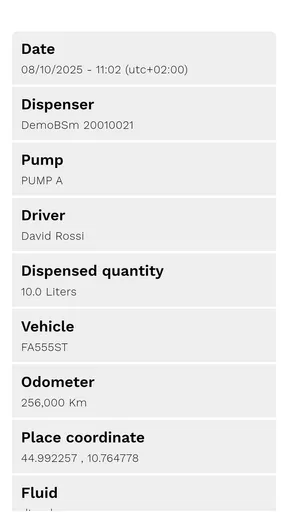
 Analysis by AppCompare
Managing fuel across several vehicles is one of those jobs that looks simple until receipts, drivers, pumps, and usage records start piling up. PIUSI B.SMART is an Android app in the Auto & Vehicles category, developed by Piusi S.p.A., and its purpose is to support fleet fuel management through the company’s B.SMART system. I approached it less like a casual driving utility and more like a control tool for people responsible for vehicles, fuel access, and consumption records.
That distinction matters. This is not an app I would install just to check fuel prices or plan a road trip. Its value depends on whether your work already involves a compatible PIUSI setup and a need to organize refuelling activity. When that context is present, the app can become a practical part of the daily routine. Without it, the experience is likely to feel narrow rather than useful.
The app is free and rated for Everyone, which makes it easy to try from a cost and age-access perspective. It has passed the 50K-install mark and holds a 4.0 average from roughly 183 ratings, with six written reviews shown publicly. Those figures suggest a real user base, but not one large enough for me to treat the app as a universally polished fleet standard. I see it as a specialist companion whose usefulness is tied closely to the surrounding hardware and operating process.
What trust looks like in a fleet fuel app
Trust has a different meaning here than it does in a consumer app. I am not mainly asking whether the interface looks modern. I want to know whether the tool helps keep fuel activity understandable: who used the system, which vehicle was involved, whether the recorded quantity makes sense, and whether a manager can review activity without depending entirely on paper notes or scattered messages.
That is the right lens for B.SMART. The store summary presents it as a way to optimize fleet consumption, but I would not read that as an automatic promise of savings. An app can make information easier to organize; it cannot correct poor refuelling habits, inaccurate vehicle assignments, or a process in which drivers share credentials casually. The strongest results will come when the app is used as part of a defined workflow rather than treated as a magic fuel-saving button.
Piusi S.p.A. is clearly identified as the developer, and the product name connects the mobile experience to a broader PIUSI fuel-management environment. For me, that is an important trust signal in one specific sense: the app appears designed around a known equipment ecosystem rather than being a generic mileage calculator pretending to manage a depot. At the same time, that specialization creates the first practical question a new user should ask: does my fleet already use the compatible B.SMART arrangement?
If the answer is no, I would not choose this app as a starting point. A spreadsheet, a fleet-management platform, or a simple expense tool may be more suitable when the main need is manual fuel logging. B.SMART makes more sense when the organization wants the mobile layer to sit alongside PIUSI equipment and a controlled refuelling process.
Worth Reading Before You Choose

EA SPORTS FC Mobile 26 Is a Bigger Football Game, but It Takes Time

Flipboard Shows What News Apps Must Do Beyond the Feed

Switching to Android Auto Means Rethinking Your Driving Routine

Google Calendar Makes a Crowded Week Easier to Manage

Ludo King Makes the Most of the Minutes Between Plans

Baby Panda World Brings Quick Play to Modern Phones, but Its Game Library Feels Busy
The first setup decision is operational, not cosmetic
Before installing it across a team, I would test the complete path with one responsible person. That means checking how the app fits the existing pump or fleet procedure, how users receive access, and what a manager can actually see after a normal refuelling event. This small pilot is more valuable than asking every driver to install the app immediately, because it exposes the points where the real work happens: account setup, vehicle identification, record review, and correction of mistakes.
I would also decide in advance who owns the account administration. A fleet app becomes difficult to trust when nobody knows who should remove a former driver, correct a vehicle assignment, or investigate an unexpected entry. Even if the app itself offers useful controls, the organization still needs a human process around those controls. That is one of the less obvious lessons with specialist tools: the quality of the records depends as much on responsibility as on software.
Controls should be judged by what the user can see
When I review an app from a data-sensitive perspective, I avoid assuming that a clean interface means strong privacy or that a specialist developer automatically means perfect security. I look for visible choices. Can the user understand which account is active? Is it clear which vehicle or refuelling context is being used? Can a manager distinguish an ordinary entry from one that needs attention? Are there straightforward ways to leave the account or change access when a role changes?
Those are the questions I would put to the person responsible for B.SMART before deployment. The app’s public store information establishes its purpose, developer, price, age rating, and current release, but a fleet manager should still inspect the actual sign-in and account screens during setup. That is where practical control becomes visible, and it is also where a team will discover whether the app suits its internal rules.
I would be especially careful with shared phones or tablets. If several people use the same device, leaving an active account open can blur responsibility. A better routine is to use individual access where the system supports it, lock the device when it is unattended, and make sign-out part of the handover process. This is not glamorous advice, but it prevents a common failure: a record exists, yet nobody can confidently connect it to the right person.
Where fuel data becomes sensitive
Fuel records may look less personal than messages or photographs, but in a working fleet they can reveal patterns. They may indicate when a vehicle is active, how often a driver visits a depot, which vehicle is assigned to a route, or when a company asset is being used. I would therefore treat B.SMART records as operational information, not as harmless numbers that can be copied freely into every chat or spreadsheet.
The most sensitive moment is often not installation. It is the ordinary refuelling event. A driver may be working quickly, using a shared device, or operating in an area with weak connectivity. If the wrong vehicle is selected or an account is left open, the error can become part of the fleet record. My practical recommendation is to make identification a deliberate two-step habit: confirm the user context, then confirm the vehicle context before completing the action.
A second sensitive moment arrives during review. Managers may be tempted to export or forward fuel information to people who do not need full access. I would keep access narrow and share summaries rather than raw records whenever possible. The useful question is not only “can this person see the data?” but “does this person need every detail to do the job?” That approach improves privacy and usually makes the information easier to understand.
Device changes deserve attention too. If a phone is replaced, sold, or handed to another employee, the old session should not simply be forgotten. I would include account review in the equipment-return checklist, alongside removing saved credentials and checking whether the device still gives access to fleet information. This workflow is easy to overlook because the app is only one item among many, yet it is exactly the kind of transition that can weaken control.
How I would use it during a normal workday
Imagine a small delivery company with several vans. A driver begins the morning with a vehicle assigned for the day, uses the company’s refuelling point during a busy shift, and needs the event associated with the correct fleet record. The driver’s priority is speed, while the manager’s priority is a reliable history of consumption. B.SMART sits between those needs: it should make the action quick enough for the driver while leaving information that the manager can examine later.
In that situation, I would not ask the driver to write a parallel paper note unless the company has a specific backup rule. Duplicate recording creates another opportunity for mismatched quantities and vehicle names. Instead, I would establish a simple exception process: if the app or connected equipment cannot complete the event, the driver records the minimum necessary details in an approved temporary log, then the responsible person reconciles it later. The important part is that the exception is visible rather than silently ignored.
For a manager, the useful habit is to review patterns at a sensible interval instead of reacting to every single entry. A one-off unusual event may be a legitimate route change or an incomplete record. Repeated differences between vehicles, users, or expected usage are more valuable signals. B.SMART can support that review process, but the judgment still belongs to the person who understands the fleet.
There is also a training advantage. New drivers often learn faster from a short, repeatable sequence than from a long manual. I would demonstrate the exact order of opening the app, selecting or confirming the relevant context, completing the refuelling action, and checking that the result was accepted. Then I would show what to do when something looks wrong. Teaching the recovery path is just as important as teaching the normal path.
Practical trade-offs against ordinary alternatives
Compared with a paper log, a dedicated digital workflow can reduce handwriting problems and make later review less dependent on someone deciphering notes. It can also give a fleet a more consistent process than asking every driver to maintain a personal fuel diary. The trade-off is that the digital method requires working accounts, suitable devices, and staff who understand what to do when the normal flow breaks.
Compared with a spreadsheet, B.SMART is more focused on the fuel-management context. A spreadsheet is flexible and familiar, but that flexibility can become a weakness when different employees create different columns, naming styles, or correction habits. The app is the better fit when the organization wants a defined system linked to its PIUSI environment. The spreadsheet remains attractive for a very small operation that only needs occasional manual summaries and does not want a specialized setup.
Compared with a broad fleet-management platform, B.SMART is likely to appeal to users who care primarily about refuelling and consumption rather than dispatch, maintenance, route planning, or driver communication. A larger platform may offer a wider operational picture, but it can also introduce more screens, subscriptions, and administrative overhead. I would choose the broader option when fuel is only one part of a complex transport operation. I would choose B.SMART when the fuel workflow itself is the central problem.
This focused design can be a strength for a depot manager who wants a narrower tool, but it may feel limiting to a driver expecting a complete vehicle companion. I would not install it on every employee’s personal phone by default. First decide which roles genuinely need mobile access. Limiting the app to the people who perform or supervise the relevant work can reduce confusion and keep account responsibilities clearer.
Version, compatibility, and the cost of change
The current version is 2.4.2, and the app requires Android 7.0 or later. That minimum requirement is not especially demanding for many Android devices, but fleet phones are often older, shared, or tightly managed. I would check the actual devices used at the depot rather than assuming compatibility from the age of the operating system alone. Screen size, battery condition, device policies, and connectivity can matter just as much during a rushed refuelling task.
The app was released on September 14, 2019, so it has had time to establish a presence rather than appearing as a brand-new experiment. Still, the release date should not replace a hands-on test. Older devices may behave differently from current ones, and an organization may have restrictions that a personal phone does not. I would run the intended workflow on the oldest supported company device before committing to a wider rollout.
Because the app is free, the initial trial is easier to justify. Free access does not remove the organizational costs, though. Someone must configure the process, train users, monitor exceptions, and decide how records are retained. I would calculate those time costs before claiming that the app is cheaper than a spreadsheet or a broader platform. Its financial value comes from making the right workflow more dependable, not merely from having no download charge.
Questions I would settle before wider deployment
A manager will reasonably want to know whether the app can be used independently of PIUSI hardware. I would answer cautiously: the product is presented as the mobile part of the B.SMART fleet-fuel environment, so I would verify compatibility with the equipment already installed before treating it as a standalone solution. If the business only wants manual expense entry, a general-purpose tool may involve less setup.
Another likely question is whether every driver needs an account. I would not create access automatically for everyone. I would map roles first: people who refuel, people who supervise, and people who only need reports may have different responsibilities. The smallest sensible access group is usually easier to train and easier to review when staff change.
Users may also ask what happens when a record is wrong. My advice is to define the correction route before launch. Do not encourage drivers to create extra entries just to compensate for an error unless the organization has confirmed that this is the correct procedure. A visible exception handled by an administrator is safer than a polished-looking history containing unexplained duplicates.
For privacy-conscious teams, I would ask the administrator to inspect the app’s permission prompts and account screens on the actual device, then explain the choices to staff in plain language. I would not infer data practices from the app’s category or from its free price. What matters is what the installed app requests, what the user can control, and how the organization limits access to the resulting fleet information.
Finally, I would ask whether the app fits the company’s backup plan. A digital system should have a clear response for device failure, connectivity problems, staff absence, and account recovery. If nobody can describe that response, the problem is not necessarily B.SMART alone; the deployment process is incomplete.
Who should use it, and who should pass
I can recommend B.SMART to a fleet owner, depot supervisor, or operations manager who already works with PIUSI equipment and wants a more organized way to handle fuel activity. It is also worth considering for a small business that has outgrown handwritten logs but does not need a full transport-management suite. The focused purpose may be exactly what makes it approachable in those environments.
I would be less enthusiastic for an individual driver, a private car owner, or anyone looking for trip tracking, maintenance reminders, navigation, or fuel-price comparisons. Those users may download it, see the specialist nature of the workflow, and wonder why it does not behave like a general driving app. That would not be a flaw in the product so much as a mismatch between tool and task.
I would also hesitate when a company has no person responsible for account administration. A fleet tool without ownership can create stale users, unclear corrections, and records that nobody reviews. In that case, even a simple spreadsheet with a carefully maintained process might be better until the business is ready to manage a dedicated system.
My final view is cautiously positive. PIUSI B.SMART has a clear job: support fleet fuel management within the PIUSI B.SMART ecosystem. Its free availability, Everyone rating, established release history, and moderate user adoption make it reasonable to evaluate, while the 4.0 average tells me to expect a useful specialist tool rather than a universally flawless experience. Its real strength is controlled, purpose-built fuel workflow—not broad vehicle convenience.
I would start with one device, one administrator, and a small group of real users. I would document the normal refuelling path, the error path, and the account-removal path before expanding. If those three routines feel clear and the connected setup matches the fleet’s needs, the app can earn its place in daily operations. If the business only needs occasional manual fuel notes, I would skip the extra structure and choose a simpler alternative.
Pros
- Remote monitoring helps track fuel usage and dispensing activity.
- Supports multiple users with role-based access and permissions.
- Compatible with PIUSI connected fuel dispensing equipment.
- Cloud-based data access is useful for managing several locations.
- Digital records can simplify audits and reduce manual paperwork.
Cons
- Requires compatible PIUSI hardware to provide its full functionality.
- Initial setup may be complex for smaller businesses or new users.
- Some features depend on a stable internet connection.
- Subscription or service costs may apply depending on the configuration.
- Limited usefulness for users without connected fuel management equipment.
FAQs for PIUSI B.SMART
What is PIUSI B.SMART used for?
PIUSI B.SMART is a mobile management app designed to work with compatible PIUSI fuel dispensing and monitoring equipment. It helps authorized users control access, identify drivers or vehicles, record refueling activity, and review fuel usage data. The app is mainly intended for businesses, fleets, workshops, and other organizations that need better oversight of fuel distribution rather than for ordinary personal vehicle owners.
What equipment is compatible with the PIUSI B.SMART app?
The application is not a universal controller for every fuel pump or dispenser. It is designed for use with compatible PIUSI B.SMART systems and connected devices, which may include specific pumps, controllers, and management configurations. Before downloading, users should confirm that their hardware supports the B.SMART platform and check whether any required gateway, Bluetooth, or network connection is available.
Does PIUSI B.SMART require an account or special authorization?
Yes, access generally depends on the configuration created by the system administrator or company managing the fuel equipment. Users may need an assigned account, identification details, permissions, or an authorized device before they can dispense fuel or view records. This means downloading the app alone does not necessarily provide access; your organization must first register you within its PIUSI B.SMART management system.
Can PIUSI B.SMART track fuel usage and refueling history?
One of the app’s main purposes is to help organizations monitor fuel transactions. Depending on the installed equipment and user permissions, it can record information such as who refueled, which vehicle or asset was selected, the amount dispensed, and when the transaction occurred. Available reports and details may vary according to the connected hardware, software setup, and administrator settings.
Does PIUSI B.SMART work without an internet connection?
The app’s offline capabilities depend on the specific PIUSI B.SMART installation and the way the connected equipment communicates with the phone. Some local operations may use Bluetooth or another direct connection, while account synchronization, remote management, and reporting can require internet access. For reliable operation, users should keep Bluetooth, mobile permissions, and network connectivity enabled whenever the system instructions require them.


